


Rummy 500 - Card Game
4.61.96K Reviews
App Specs
- Version
- 1.1.4
- Updated On
- License
- Free
- Downloads
- 1,000,000+
- Developer
- FIOGONIA LIMITED
- Categories
- Card
- Platform
- Android
Screenshots





 Analysis by AppCompare
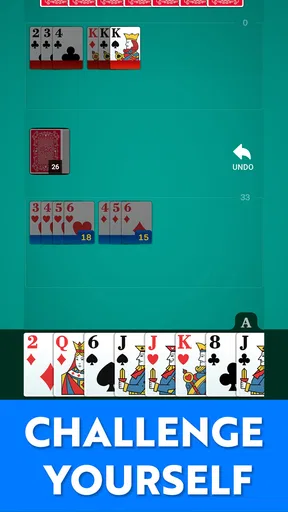
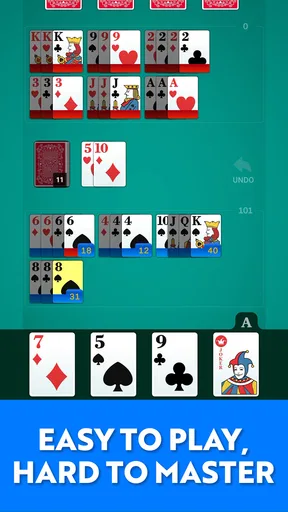
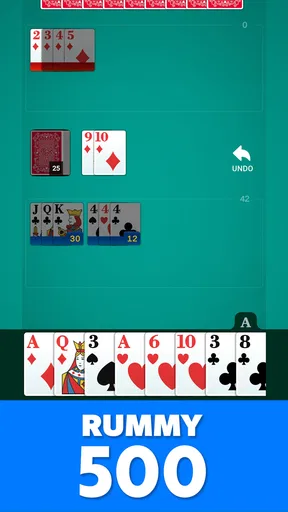
In Rummy 500 - Card Game, the appeal is the familiar rhythm of building melds: draw, decide what might become useful, then discard with a plan. I like this kind of card game because it rewards attention without demanding a long setup or a complicated rulebook. The large cards make the hand easier to scan, while the smart AI gives solo play a practical opponent. For me, that combination matters more than flashy extras: it makes a quick game feel approachable while leaving room to think.
A familiar game with room to think
Rummy 500 is a card game from FIOGONIA LIMITED, and its central draw is a straightforward one: play the classic format on a phone, with cards that are comfortable to read and an opponent controlled by the game. That focus suits the rules. Most of the interesting decisions happen in your hand and in what you can infer from the cards being taken or discarded, so a clean table helps me concentrate instead of fighting the interface.
The large-card approach is useful well beyond a first impression. When I am playing on a smaller screen or glancing down between other tasks, a readable hand makes it easier to compare suits and ranks before committing to a discard. It also reduces the chance that a fast tap becomes a careless move. The benefit is practical, not decorative: the game asks me to look at the cards, and the presentation helps me do that.
How a round feels in practice
The basic loop is easy to understand even if you are new to Rummy 500: draw a card, look for combinations that can become melds, and discard one you are willing to let go. The decisions become more interesting as the hand develops. A card that seems expendable early may complete a useful set later, while holding too many hopeful singles can leave you with a hand that never comes together. I find that tension is what keeps a familiar ruleset engaging.
The AI makes the game available when nobody else is ready to play. I can settle into a round at my own pace, pay attention to the visible choices, and use each hand to practise judging what to keep. That makes solo play useful for returning players who want to refresh their instincts as well as newcomers learning how melds fit together. I would not treat a computer opponent as a substitute for every kind of human competition, but it is a convenient way to get a game going.
Why the clean presentation helps
There is a quiet advantage to a card game that does not crowd the table with distractions. Here, the emphasis is on the hand and the next decision, which suits short sessions particularly well. I can imagine playing during a relaxed break, waiting for an appointment, or winding down at home without needing to follow a story or remember a long sequence of objectives. The game’s smooth, uncluttered feel supports that use, though the simple format will naturally be less compelling for someone who wants constant novelty.
One useful habit is to pause before discarding and ask what the card might give away, not only what it does for your own hand. That small check can make a casual round feel more thoughtful. Another is to avoid keeping every card that might eventually help: a hand full of possibilities can be less useful than committing to combinations that are already taking shape. Those are general Rummy 500 decisions, but a readable mobile table makes it easier to practise them without losing track of the hand.
Worth Reading Before You Choose

Baby Panda World Brings Quick Play to Modern Phones, but Its Game Library Feels Busy

ESPN’s Live Game View Makes Following Close Games Easier

QuizzLand Review: A Good Fit for Short Trivia Breaks, Not Every Player

Basketball Stars: Multiplayer Is Fast, but Can It Recover When Matches Go Wrong?

WEBTOON Turns Phone Updates Into a Better Reading Routine

Link to Windows Runs on Shared Habits, Not Social Feeds
Who will enjoy it—and who may not
I would recommend this to anyone who already enjoys traditional rummy-style play and wants a convenient solo option, or to a beginner who prefers learning through repeated hands rather than studying rules first. It is especially suited to people who value legible cards and a direct route into play. If your ideal card app depends on social interaction, a lively multiplayer community, frequent new modes, or elaborate collection systems, this may not be the strongest fit. The appeal is the classic game itself, not a broad package of extras.
The game is free to download and rated for Everyone, which makes it easy to try as a casual choice. It has a 4.7 average from around 4.9 thousand ratings, and has passed 100 thousand installs. Those figures suggest a healthy audience, but they do not tell me whether its particular pace is right for you; the best test is whether you enjoy thinking through a hand against the AI. The current version is 1.0.9, and it runs on Android 7.0 or later.
Trade-offs before you settle in
Because the experience stays close to a familiar card game, its strengths and limits come from the same place. The clean presentation and smart AI make it easy to start a round, but the core loop is still draw, meld, and discard. If you want a card game built around dramatic progression, changing objectives, or a strong social layer, a more feature-heavy alternative may hold your attention longer. If you want a simple way to play Rummy 500 without arranging a physical deck or waiting for company, this is a more natural choice.
Small choices that improve a session
For a quick break, I would begin a round when I have enough time to finish it rather than treating every spare minute as an invitation to start another hand. Rummy depends on remembering what is useful and responding to what appears, so interruptions can make it harder to keep a clear plan. If you are learning, focus on one decision at a time: first identify cards that already form a meld, then weigh which loose cards are worth holding. That is a more useful way to build confidence than trying to predict the whole round.
When the AI takes or discards a card, use that information cautiously. It can give you a clue about what may be useful to the opponent, but one move is not proof of a complete strategy. I find it better to use these signals as a reason to reconsider a discard rather than to chase every card the computer might want. That keeps the game’s uncertainty intact and helps prevent overthinking a casual session.
Cost, access, and the right expectations
Although the game is free to download, it includes optional in-app purchases priced from $4.99 to $29.99 per item. I would approach those as a personal spending choice, not a requirement for enjoying the basic appeal of a familiar card game. Before buying anything, check what the purchase offers in the app and whether it addresses a real annoyance for you. A free starting point is useful, but it is still sensible to keep an eye on purchase prompts, especially if a child is using the device.
For anyone comparing it with a physical deck, the phone version wins on convenience: it is ready when a table and another player are not. A paper game is still better when conversation and shared play are the main point, and a multiplayer-focused app is a better direction if you specifically want opponents who are people. This version makes most sense when the rules and the hand are enough to keep you interested on their own.
A grounded recommendation
After spending time with it, I see Rummy 500 - Card Game as a focused option rather than an all-purpose card hub. Its readable cards and AI-led solo play are the reasons I would keep it in mind, particularly for a quiet break or a low-pressure way to practise. FIOGONIA LIMITED has kept the idea easy to grasp, and that simplicity is a real benefit when I want to play without a group or a lengthy setup.
It is not the right pick for everyone: players who need human opponents, a changing set of modes, or a more elaborate sense of progression should look elsewhere. But if a classic Rummy 500 hand is exactly what you want, the straightforward format makes a sensible case for giving it a try. I would start with a few free sessions, see whether the AI and pace suit you, and only consider an optional purchase if you have a clear reason to do so.
Getting Started with Rummy 500
First things first, downloading and setting up Rummy 500 - Card Game is a breeze. Available on both Android and iOS, the app is lightweight and doesn’t take up too much space on your device. Once downloaded, you'll be greeted by a simple and intuitive interface that makes navigation a cinch. Even if you’ve never played Rummy before, the app’s tutorial will have you up and running in no time.
Gameplay and Features
The game itself stays true to the classic rules of Rummy 500. You’re dealt a hand, and the objective is to form melds by drawing and discarding cards. The app provides several levels of difficulty, so whether you're a beginner or a pro, there's a challenge waiting for you. One feature I particularly enjoyed was the ability to play against both the computer and other players online. This adds a competitive edge that keeps things interesting.
Another cool feature is the customization options. You can choose different deck designs and table backgrounds, giving the game a personal touch. It's these little details that make the experience more engaging. Plus, the app includes a score tracker and performance stats, so you can keep tabs on your progress and brag about your victories!
Visuals and Sound
Visually, the app is clean and appealing. The graphics are smooth, and the animations are subtle yet effective. The developers did a great job of maintaining a balance between aesthetics and functionality. The sound effects are just right—not too overbearing but enough to keep you immersed in the game. You can also mute them if you prefer to play in silence.
User Experience
One aspect that can make or break a mobile game is the user experience, and I must say, Rummy 500 - Card Game does not disappoint. The controls are responsive, and the game runs smoothly without any noticeable lag. Navigating through the app is straightforward, and you won’t find yourself lost in endless menus.
However, like most free apps, Rummy 500 does have ads. They’re not too intrusive, but if you’re someone who finds them bothersome, there’s an option to purchase an ad-free version. Given the quality of the game, it might be worth considering.
Conclusion: Is Rummy 500 for You?
So, is Rummy 500 - Card Game worth your time? Absolutely! It’s a delightful mix of traditional card game mechanics and modern app features. Whether you’re looking to kill some time or challenge your friends, this app has got you covered. With its user-friendly design and engaging gameplay, it’s easy to see why it’s a hit among card game enthusiasts.
If you haven't already, give it a try! Who knows, you might just become the next Rummy champion among your friends. Happy playing!
Pros
- Engaging multiplayer mode available.
- Smooth and intuitive user interface.
- Regular updates with new features.
- Offline mode for practice sessions.
- Quick matchmaking for fast games.
Cons
- In-app ads can be distracting.
- Limited customization options.
- Requires internet for multiplayer.
- Occasional connectivity issues.
- Some features locked behind paywall.
FAQs for Rummy 500 - Card Game
What platforms is Rummy 500 - Card Game available on?
Rummy 500 - Card Game is available on both Android and iOS platforms. You can download it from the Google Play Store for Android devices and the Apple App Store for iOS devices. Ensure that your device meets the minimum system requirements for smooth gameplay.
Is an internet connection required to play Rummy 500 - Card Game?
Rummy 500 - Card Game can be played both online and offline. While an internet connection is required for online multiplayer modes and to access leaderboards, you can enjoy playing against AI opponents without any connectivity. This flexibility makes it convenient for players on the go.
Are there in-app purchases in Rummy 500 - Card Game?
Yes, Rummy 500 - Card Game includes in-app purchases. Players can buy additional features, card decks, or remove ads to enhance their gaming experience. While the game is free to download, some in-app purchases might be necessary to access premium content or features.
What age group is Rummy 500 - Card Game suitable for?
Rummy 500 - Card Game is generally suitable for players aged 12 and up. The game involves strategic thinking and understanding of card rules, making it ideal for teenagers and adults who enjoy classic card games. Parents can review the app’s content to ensure it aligns with their family’s preferences.
How can I improve my skills in Rummy 500 - Card Game?
To improve your skills in Rummy 500 - Card Game, start by understanding the rules and strategies associated with Rummy 500. Practice regularly against AI opponents to refine your tactics. Additionally, participating in online multiplayer matches can expose you to diverse playing styles, further enhancing your skills.


